
01
Unstructured services
Price, duration, images, and service details are scattered across posts, highlights, and messages.
SaaS for beauty services, booking, and business operations
A SaaS case study for beauty professionals who need to showcase services, accept booking requests, organize their team, track Pix deposits, and manage subscriptions and administration in their own platform.
This private system is shown through interface screenshots, workflow details, and fictional data to protect business rules and sensitive information.
Shows
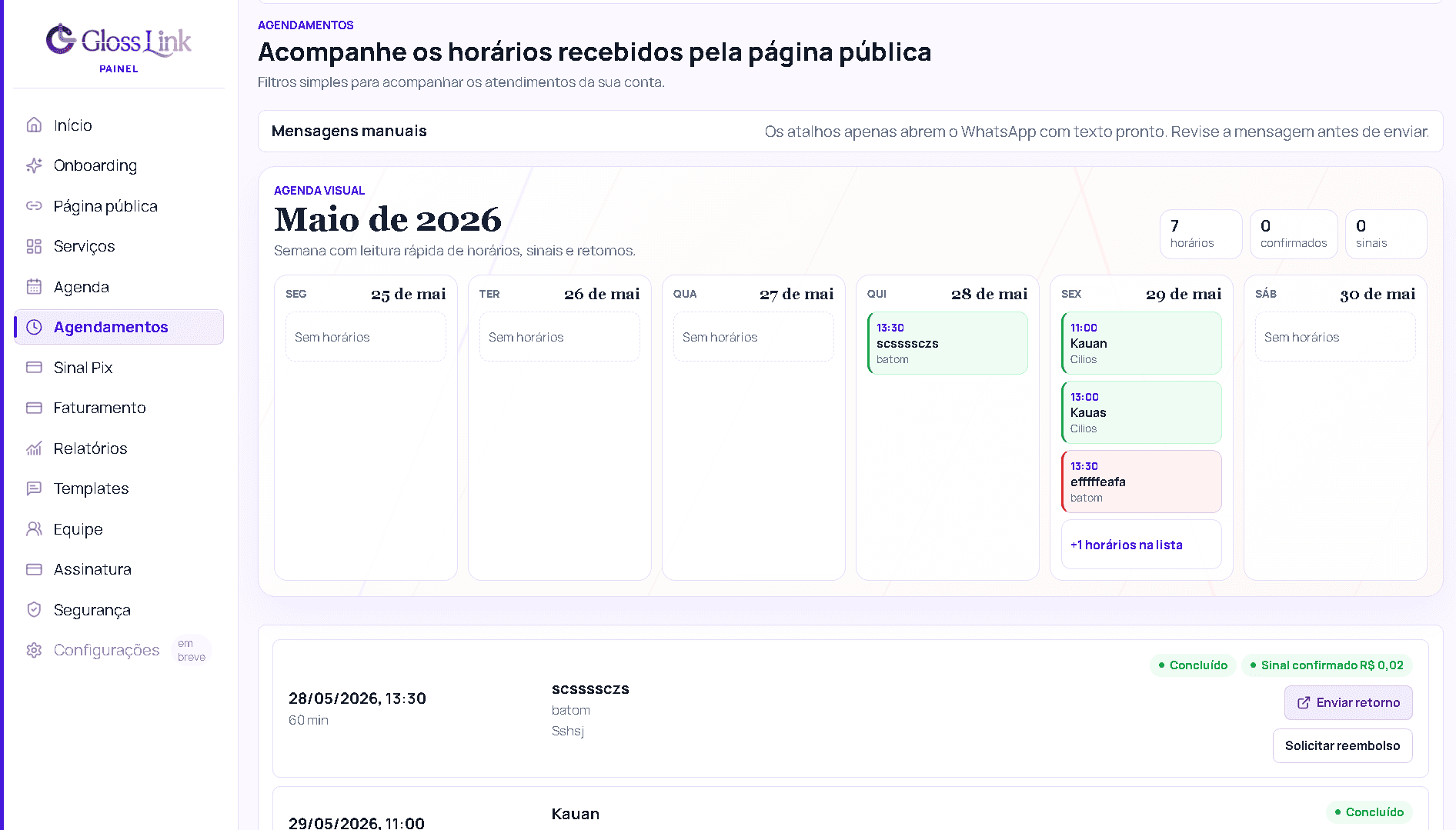
A working booking dashboard
Bookings, incoming requests, and statuses appear together so the team can manage the day.
Solves
Less improvisation in WhatsApp
Services, Pix deposits, and booking requests move beyond manual conversations into a clear dashboard workflow.
Why it matters
A foundation for SaaS
The product already separates the public experience, booking calendar, team, tenants, and administration so it can grow as a platform.
Instagram and WhatsApp can drive sales, but they do not provide the structure needed for bookings, Pix deposits, team access, permissions, and recurring operations.
Price, duration, images, and service details are scattered across posts, highlights, and messages.
Available times, Pix deposits, and confirmations depend on back-and-forth messages and constant checking.
Professionals, permissions, and calendars can grow without a clear operational structure.
Selling the tool as a product requires tenant, subscription, log, and support controls.
Gloss Link connects a public page, service catalog, booking calendar, and internal dashboard in a SaaS workflow.
The page brings the profile, services, availability, and booking CTA into one simple experience.
Price, duration, and images answer common questions before the client reaches out.
The calendar organizes availability and records the booking request in the dashboard.
The internal dashboard brings together Pix deposit status, bookings, permissions, and follow-up.
The screens below show the public experience and internal dashboard with fictional data. No real professionals, customers, or metrics are displayed.
Booking dashboard
Turns requests from the public page into an operational workflow with a calendar and clear statuses.
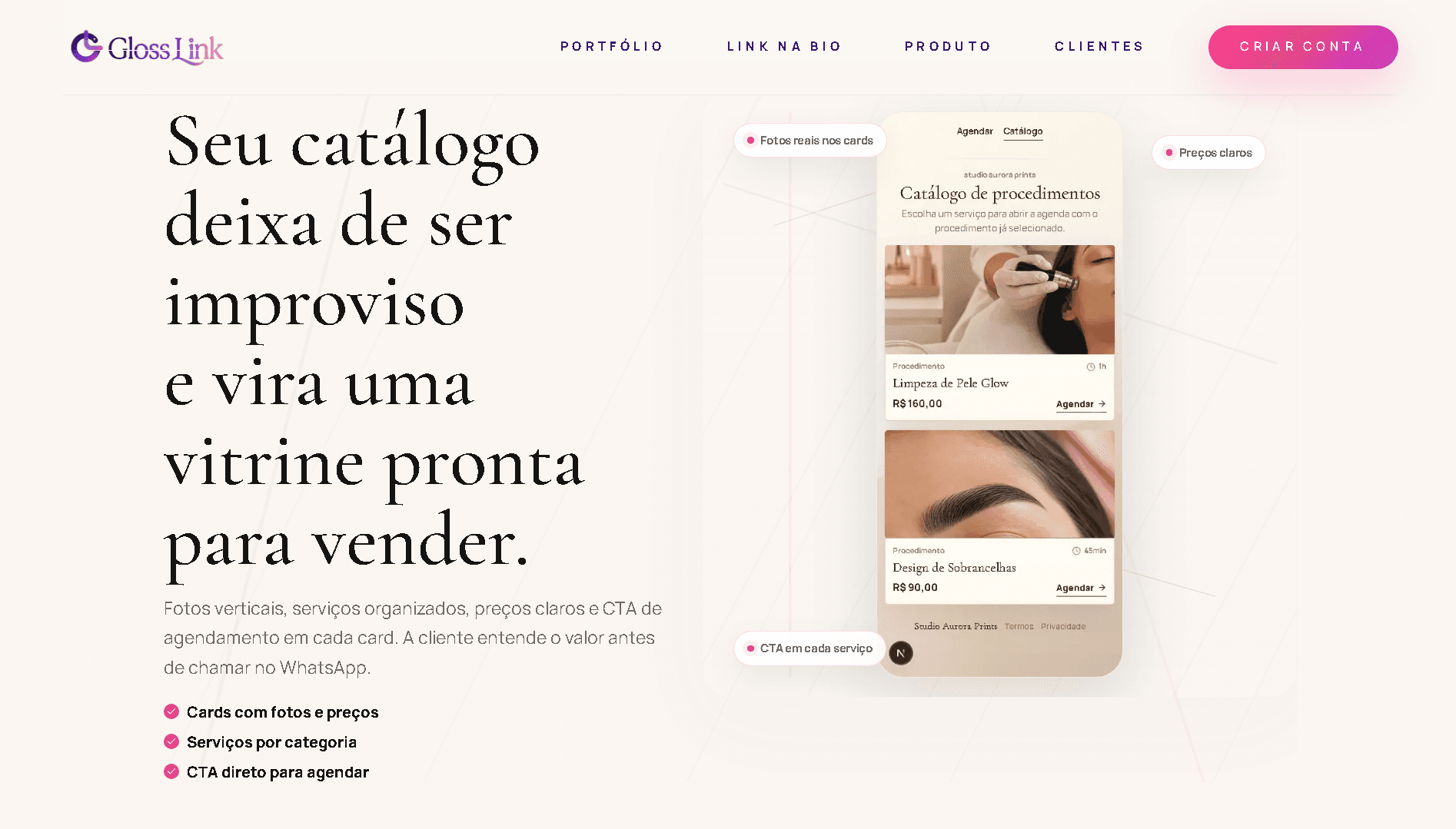
Public service catalog
Presents services, prices, images, and a booking CTA in one branded link, answering common questions before a client books.
Gloss Link combines a public storefront, booking calendar, team access, subscriptions, and administration to support the full sales cycle for beauty professionals.
The public page works like a focused link-in-bio, but is designed to move visitors toward services and booking.
Space to introduce the professional, explain what sets the business apart, and share important channels.
Each service can include an image, price, duration, and description to make the choice easier.
Bookings and services are the operational core of Gloss Link, connecting the public experience with the internal dashboard.
Clients understand the service before requesting a time, reducing repetitive questions.
The team tracks requests, booking status, manual Pix deposits, and each professional's calendar.
Manual Pix deposit tracking supports businesses that still reconcile payments outside the system but need the status recorded in their dashboard.
The team marks a payment as received, pending, or under review without relying on an external spreadsheet.
Pix deposit status stays connected to the booking, supporting confirmation and day-to-day organization.
As a SaaS product, the platform must separate each business, team, service catalog, and calendar as it grows.
Each tenant has its own team, services, public page, booking calendar, and settings.
An internal area manages subscriptions, accounts, logs, plans, and overall SaaS visibility.
Roles control who can change services, bookings, Pix deposit status, and settings.
Records help the team understand changes, support requests, and important events across the platform.
The administrative layer supports plans, subscriptions, tenants, customer support, and operational visibility.
AbacatePay integration supports commercial access, billing, and tenant status.
The dashboard brings together accounts, logs, plans, support, and operational decisions for the platform.
The case study involves end-customer data, bookings, and business accounts. The public demo therefore uses fictional data and demonstration screenshots.
Data collection is limited to what is needed for booking, communication, and business operations.
Authentication, roles, and tenant rules reduce the risk of access across separate businesses.
The portfolio uses demo professionals, services, and bookings to protect real information.
Logs and monitoring help investigate failures and keep the platform operational.
The stack supports the public page, booking, internal dashboard, tenants, payments, logs, and security.
The technology supports the day-to-day product experience, data, integrations, security, logs, and automation.
A responsive interface presents services and guides clients toward booking.
Data is separated by business, team, permissions, services, and booking calendar.
AbacatePay supports subscription management and the commercial foundation of the SaaS.
RLS, monitoring, and sound security practices support operations and troubleshooting.
Next step
If you need to turn bookings, a public service page, team management, or subscriptions into a SaaS platform, message me to discuss the scope and first workflows.